Introducing Card Processing Fees

It’s been a long time coming, but you can now set a store-wide card processing fee to pass on to customers who pay by credit or debit card. Until now, the only options Quail offered were for you to take the fee out of your profit or pass it on to your vendors; with the new card processing fee option you can instead opt to charge an extra percentage fee for all customers who buy items or make layaway payments using a credit or debit card (including contactless payments like Apple or Android Pay).
Important!
Before you turn on card processing fees, make sure you haven’t set the Credit Card Rate to anything other than blank or 0 for any open booths. Setting both a store-wide card rate and a booth card rate will cause you to ‘double dip’ on the card fee, which is a bit shady. Shoot us an email at support@quailhq.com if you want to make sure this is set up correctly!
To set a card processing fee, open up Store on the left-hand side of Quail, then click Settings. Scroll down to the Sales section, and find the option for Customer Card Fee:

What should you set your card processing fee to? If you’re using Square you’re probably paying a rate that works out to roughly 2.7%, so set it to 2.7; if you’re using a different card processor you’ll need to check with them to find out what rate you’re paying. If it’s a mixed rate (like 2.6% + $0.10) you’ll need to pick a flat percentage; passing on a flat fee is legally questionable in some states.
Speaking of which: if you want to charge a higher fee you should probably confirm with a state tax professional what the maximum allowable fee is. For example, in Maryland convenience fees are capped at a maximum of 4%; in Colorado, they’re capped at 2%.
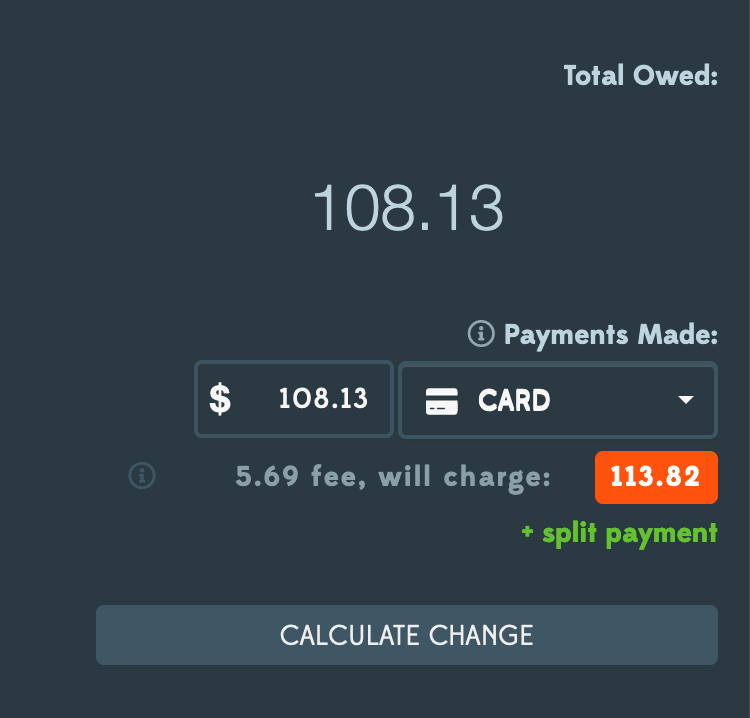
Once you’ve set a customer card rate, card payments in new transactions will show a new badge below the payment indicating the total charge including the fee:
After making a few card sales, you’ll start to see the total collected fees in your store reports:

A couple of other quick things to note about card fees:
- They’re also applied to layaway payments if the customer pays by card, and the fee does not apply toward paying down the layaway balance.
- Refunds do not include the card fee, since most card processors (including Square) don’t refund transaction fees.
- Changing the customer card rate won’t retroactively apply to past sales, only new ones – so you can’t go back and add a fee to sales that have already happened.
At Quail we still think charging customers a convenience fee for paying by card is kind of icky – it’s 2023, and if your stores are anything like ours most of your customers are paying by card. We think it’s nicer to just build the fee into your prices (or, even easier, build it into your consignment fee and leave it up to your vendors). But for folks who want to just add a 4% fee when a customer pays by card, that’s now a thing you can do!